TalkGraphics.com  

Go Back   TalkGraphics.com > Welcome to TalkGraphics! > Announcements & Feedback

Reply
 
Thread Tools Display Modes
  #1  
Old 28 August 2006, 08:31 PM
AntonyF's Avatar
AntonyF AntonyF is offline
Member
 
Join Date: Oct 2003
Location: UK
Posts: 1,223
Default TalkGraphics upgraded to version 3.6

This is a repost of the recent annoumcent. I am pleased to announce that TalkGraphics is running on version 3.6 of vBulletin. There are many new features, but here I've outlined a few of the key ones that will benefit you.

This information is lifted from vBulletin's website:

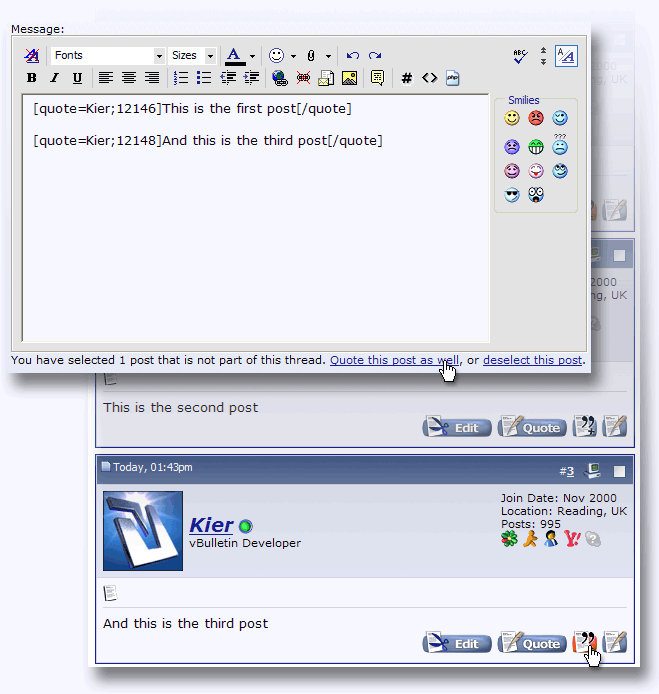
Multi-Quote
The much-requested multi-quote feature allows users to tag multiple posts that they wish to respond to by clicking a small button on each post. Once the user clicks the reply button, each tagged post is quoted.

To increase usability, by default, only posts within the current thread are automatically quoted. If you wish to quote posts in other threads with multi-quote, you simply need to click a link on the reply page, and the text of those posts will be added without a reload.


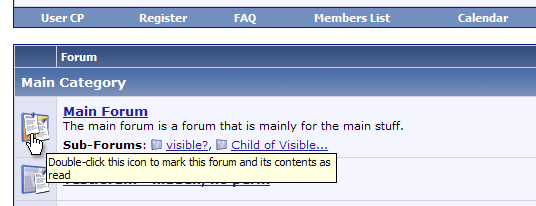
Mark Forums Read with AJAX
If you wish to mark a forum read, you can simply click its status icon on the index page and the change will be processed without a reload. You can even mark individual sub-forums as read in the same way. [Antony - I seem to need to double click the icon].


Quote Tags Link to Quoted Post
When quoting a post, the ID of the post is automatically included with the [quote] tag. When the quoted text is viewed in a thread, a small icon links back to the quoted post.

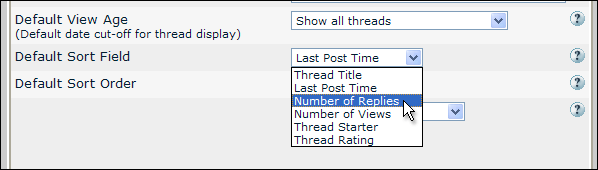
Default Thread Sorting Option per Forum
You may now choose how threads will be sorted on a per forum basis. Options include the field and direction to sort using.


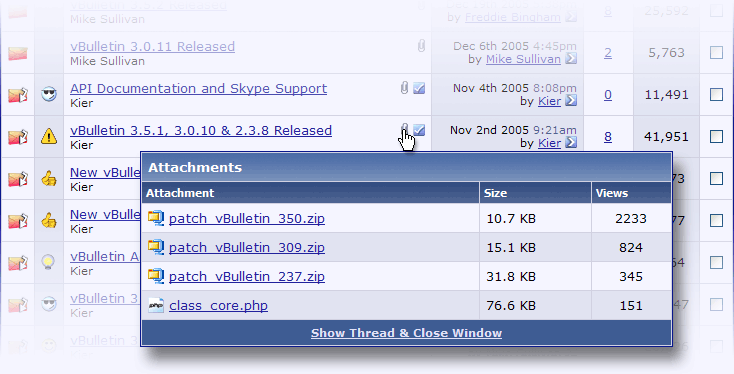
Pop Up List of Attachments in a Thread

The paperclip icon that denotes whether a thread contains attachments is now clickable. It will pop up a window that shows a list of all the attachments in the specified thread, including file size and number of views.


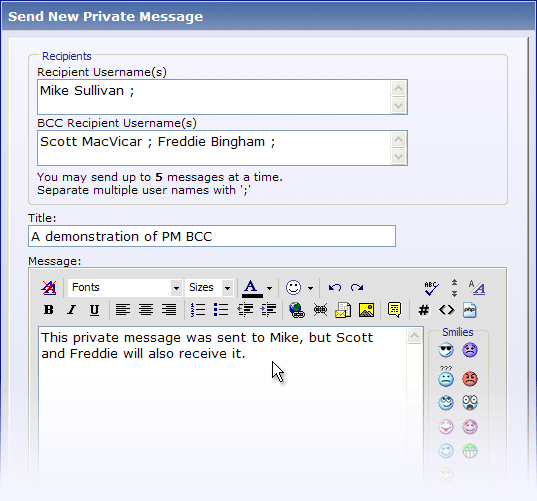
Full BCC Support in Private Messages

A number of you have discovered this by now. Like in an email, BCC (blind carbon-copy) allows you to hide the full list of recipients from each recipient. In previous versions of vBulletin, the “to” field acted like a BCC field. Now, the “to” field acts like the field in an email; each recipient will see all the names in the “to” field.

Reply With Quote
  #2  
Old 29 August 2006, 12:34 AM
Egg Bramhill's Avatar
Egg Bramhill Egg Bramhill is offline
Moderator
 
Join Date: Aug 2000
Location: Harwich, Essex, England
XXP5, X3D6, XWD5
Posts: 9,957
Default Re: TalkGraphics upgraded to version 3.6

Quote:
Mark Forums Read with AJAX - You can even mark individual sub-forums as read in the same way. (Antony - I seem to need to double click the icon).
This only seems to work for a short period. If you drill down into a forum, read a thread & return the icon reverts back to the "New Posts" icon.

Anyone else find this the case?
__________________
Egg
ENJOY IRRESPONSIBLY.
Dell Vostro 200 / Intel Core Duo CPU E7200 @ 2.53 GHz / RAM 4 GB / ATI Radeon HD 2600 XT Dual Monitor / Vista Business
Reply With Quote
  #3  
Old 29 August 2006, 09:09 AM
The Alien's Avatar
The Alien The Alien is offline
Member
 
Join Date: Aug 2004
Location: The Netherlands
Xara X¹
Posts: 569
Default Re: TalkGraphics upgraded to version 3.6

Quote:
Originally Posted by Egg Bramhill View Post
This only seems to work for a short period. If you drill down into a forum, read a thread & return the icon reverts back to the "New Posts" icon.

Anyone else find this the case?
So you mark it as read first and you go into the forum and read one of the threads that was unread (now shows as read) and return to find the icon has reverted back to unread? I didn't get this.

Though I do get other weirdness with this system:
reading all the threads with new posts in a forum and in the last thread, returning to the forum's main index (via the link in the breadcrumb, top of the page) shows me that forum as still unread. Going there again shows all threads as "read".
I think this vB system works differently on each PC
Reply With Quote
Reply

Bookmarks

Thread Tools
Display Modes

Posting Rules
You may not post new threads
You may not post replies
You may not post attachments
You may not edit your posts

BB code is On
Smilies are On
[IMG] code is On
HTML code is Off
Forum Jump


All times are GMT +1. The time now is 03:13 PM.


Powered by vBulletin® Version 3.7.2
Copyright ©2000 - 2010, Jelsoft Enterprises Ltd.
©2006 Xara Group Ltd.